Showing posts with label tech_Metadata. Show all posts

Wednesday, January 2, 2019

X++ | d365FO - Create a list of table name lookup

This is very similar to X++ | d365FO - Create a lookup with a table fields list. Just show another example which looks quite simpler.

Scenario / expected result
We have a string control on a form, then we'd like to have a lookup which shows all of table name from AOT.


Solution
The overview processes are:

  1. Create a temp table with metadata-populate method
  2. Add a lookup method to the table that will be a form's data source
  3. Add a lookup method on the form's control

1. Create a temp table with metadata-populate method

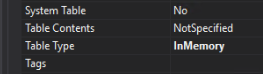
Create 'aaaTableNameListTemp' table. Set it as InMemory table. Add a string 'TableName' field (extends from IdentifierName or else you want).



Create 'populate' method
 using Microsoft.Dynamics.AX.Metadata.MetaModel;  
 public class aaaTableNameListTemp extends common  
 {  
   public static aaaTableNameListTemp populate()  
   {  
     aaaTableNameListTemp table;  
     var tables = Microsoft.Dynamics.Ax.Xpp.MetadataSupport::TableNames();  
     while (tables.MoveNext())  
     {  
       table.clear();  
       table.initValue();  
       table.TableName = tables.Current;  
       table.insert();  
     }  
     return table;  
   }  
 }  

2. Add a lookup method to the table that will be a form's data source

For example, if our table is 'aaaTable' table. Add 'lookupTableName' method on that table.
   public void lookupTableName(FormStringControl _control)  
   {  
     SysTableLookup    lookup;  
     QueryBuildDataSource qbds;  
     Query q = new Query();  
     qbds = q.addDataSource(tableNum(aaaTableNameListTemp));  
     qbds.addSortField(fieldNum(aaaTableNameListTemp, TableName), SortOrder::Ascending);  
     lookup = SysTableLookup::newParameters(tableNum(aaaTableNameListTemp),  
              _control,  
              true);  
     lookup.addLookupField(fieldnum(aaaTableNameListTemp, TableName), true);  
     lookup.parmQuery(q);  
     lookup.parmTmpBuffer(aaaTableNameListTemp::populate());  
     lookup.performFormLookup();  
   }  

3. Add a lookup method on the form's control

On your desired control, override 'lookup' method and put the below code.


   [Control("String")]  
   class Grid_FormName  
   {  
     public void lookup()  
     {  
       aaaTable.lookupTableName(this);  
     }  
   }  

That's all!


Ref: thanks Ajt for a useful post Metadata Lookup - list of forms in D365.

Monday, November 19, 2018

X++ | d365FO - Create a lookup with a table fields list

This post shows the same scenario with this X++ | ax 2012 - Create a lookup with a table fields list but now in version d365FO.

First of all, I would give all references I did research for this purpose here. Many thanks and really appreciate for all these post!!
http://dev.goshoom.net/en/2016/02/utilelements-in-ax-7/
http://dev.goshoom.net/en/2016/11/new-metadata-api/
AX7 Get information about table extension using Microsoft.Dynamics.Ax.Xpp.MetadataSupport
http://theinfolog.com/creating-a-lookup-to-aot-objects/

Scenario
Again, we have a table, for example SalesTable. Then we would like to create a lookup with all fields from that table. Now, this is a way we can do in d365FO.

Solution

In this version, we cannot use Utilelements table anymore, so the steps will be like this.

1. Create a temp (InMemory) table, YourFieldNameTemp. In this case, there is only one field name "Name" in it.

2. Add a static method as follows. You will note that _tblName is the name of table we want its fields name.

 using Microsoft.Dynamics.AX.Metadata.MetaModel;  
 public class YourFieldNameTemp extends common  
 {  
   public static YourFieldNameTemp populate(TableName _tblName)  
   {  
     YourFieldNameTemp yourFieldNameTemp;  
     //AxTable table = Microsoft.Dynamics.Ax.Xpp.MetadataSupport::GetTable(tableStr(SalesTable));  
     AxTable table = Microsoft.Dynamics.Ax.Xpp.MetadataSupport::GetTable(_tblName);  
     var fields = table.Fields;  
     var fieldEnumerator = fields.GetEnumerator();  
     while (fieldEnumerator.MoveNext())  
     {  
       yourFieldNameTemp.initValue();  
       AxTableField field = fieldEnumerator.Current;  
       yourFieldNameTemp.Name = field.Name;  
       yourFieldNameTemp.insert();  
     }  
     return yourFieldNameTemp;  
   }  
 }  


3. The same as ax 2012, you have a field and already override "Lookup" method.


In the Lookup method, put this below code.

   [Control("String")]  
   class YourFormStringControl  
   {  
     public void lookup()  
     {  
       YourExampleTable.lookupTableField(this);  
     }  
   }  

4. At YourExampleTable table, insert this below method. You will note that the name of table we'd like to get all lists is from ..(this.refTableName).  You can change it to fit your need.

   public void lookupTableField(FormStringControl _control)  
   {  
     SysTableLookup           lookup;  
     QueryBuildDataSource qbds;  
     Query q = new Query();  
     qbds = q.addDataSource(tableNum(YourFieldNameTemp));  
     lookup = SysTableLookup::newParameters(tableNum(YourFieldNameTemp),  
                         _control,  
                         true);  
     lookup.addLookupField(fieldnum(YourFieldNameTemp, Name), true);  
     lookup.parmQuery(q);  
     lookup.parmTmpBuffer(YourFieldNameTemp::populate(this.refTableName));  
     lookup.performFormLookup();  
   }  


That's all.

Thanks for reading and until the next post!

X++ | ax 2012 - Create a lookup with a table fields list

Scenario
Let's say we have a table, for example SalesTable. Then we would like to create a lookup with all fields from that table. This below is a simple way we can do in ax 2012.

Solution
So you have a field with lookup (override) method as follows.


In the lookup method, put this below code.

 public void lookup()  
 {  
 ;  
   YourExampleTable.lookupTableField(this);  
 }  

At YourExampleTable table, insert this below method. You will note that the name of table we'd like to get all lists is from ..tableName2id(this.refTableName).  You can change it to fit your need.

 public void lookupTableField(FormControl _formControl)  
 {  
   SysTableLookup sysTableLookup = SysTableLookup::newParameters(Tablenum(Utilelements),_formControl);  
   Query query = new Query();  
   QueryBuildDataSource qbd;  
 ;  
   SysTableLookup.addLookupfield(fieldnum(Utilelements,name));  
   qbd = query.addDataSource(Tablenum(Utilelements));  
   qbd.addRange(fieldnum(Utilelements,RecordType)).value(queryvalue(UtilelementType::TableField));  
   qbd.addRange(fieldnum(Utilelements,ParentId)).value(queryvalue(tableName2id(this.refTableName)));  
   sysTableLookup.parmQuery(query);  
   systableLookup.performFormLookup();  
 }  


That's all!