Scenario / expected result
We have a string control on a form, then we'd like to have a lookup which shows all of table name from AOT.

Solution
The overview processes are:
- Create a temp table with metadata-populate method
- Add a lookup method to the table that will be a form's data source
- Add a lookup method on the form's control
1. Create a temp table with metadata-populate method
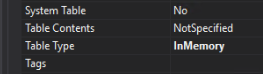
Create 'aaaTableNameListTemp' table. Set it as InMemory table. Add a string 'TableName' field (extends from IdentifierName or else you want).

Create 'populate' method
 using Microsoft.Dynamics.AX.Metadata.MetaModel;
 public class aaaTableNameListTemp extends common
 {
   public static aaaTableNameListTemp populate()
   {
     aaaTableNameListTemp table;
     var tables = Microsoft.Dynamics.Ax.Xpp.MetadataSupport::TableNames();
     while (tables.MoveNext())
     {
       table.clear();
       table.initValue();
       table.TableName = tables.Current;
       table.insert();
     }
     return table;
   }
 }
2. Add a lookup method to the table that will be a form's data source
For example, if our table is 'aaaTable' table. Add 'lookupTableName' method on that table.
For example, if our table is 'aaaTable' table. Add 'lookupTableName' method on that table.
   public void lookupTableName(FormStringControl _control)
   {
     SysTableLookup    lookup;
     QueryBuildDataSource qbds;
     Query q = new Query();
     qbds = q.addDataSource(tableNum(aaaTableNameListTemp));
     qbds.addSortField(fieldNum(aaaTableNameListTemp, TableName), SortOrder::Ascending);
     lookup = SysTableLookup::newParameters(tableNum(aaaTableNameListTemp),
              _control,
              true);
     lookup.addLookupField(fieldnum(aaaTableNameListTemp, TableName), true);
     lookup.parmQuery(q);
     lookup.parmTmpBuffer(aaaTableNameListTemp::populate());
     lookup.performFormLookup();
   }
3. Add a lookup method on the form's control
On your desired control, override 'lookup' method and put the below code.

On your desired control, override 'lookup' method and put the below code.
   [Control("String")]
   class Grid_FormName
   {
     public void lookup()
     {
       aaaTable.lookupTableName(this);
     }
   }
That's all!
Ref: thanks Ajt for a useful post Metadata Lookup - list of forms in D365.

