Showing posts with label ver_c_ax2012. Show all posts

Monday, September 19, 2022

TFS | TF400324: Team Foundation services are not available | The underlying connection was closed

 Recently I found this interesting issue on one of my AX2012 Dev machine which connects basically to TFS. 


Problem's keywords

  • TF400324: Team Foundation services are not available
  • The underlying connection was closed


Solution

I found that these following instruction works for my case.

1.      Open up a PowerShell command prompt, running it with elevated privileges

2.      Run the following command for 64 bit applications:

# set strong cryptography on 64 bit .Net Framework (version 4 and above)
Set-ItemProperty -Path 'HKLM:\SOFTWARE\Wow6432Node\Microsoft\.NetFramework\v4.0.30319' -Name 'SchUseStrongCrypto' -Value '1' -Type DWord 

3.      Run this command for 32 bit applications

# set strong cryptography on 32 bit .Net Framework (version 4 and above)
Set-ItemProperty -Path 'HKLM:\SOFTWARE\Microsoft\.NetFramework\v4.0.30319' -Name 'SchUseStrongCrypto' -Value '1' -Type DWord 

4.      Reboot.


References

Thursday, April 14, 2022

X++ | AX2012 - Create a class name list lookup

This is almost the same thing as this post X++ | d365FO - Create a list of table name lookup, but in AX2012.


Thanks Muhammad Afsar Khan here as the original source code and idea comes from his post Display all/specific AOT tables in a lookup.


The overview processes are very similar to D365FO version, but now we don't need to create the temp table:

  1. Add a lookup method to the table that will be used as a form's data source
  2. Add a lookup method to the form control


1. Add a lookup method to the table that will be used as a form's data source


 public void lookupClassName(FormStringControl _control)  
 {  
   QueryBuildDataSource  qbds;  
   Query          q = new Query();  
   SysTableLookup     lookup = SysTableLookup::newParameters(tableNum(UtilidElements), _control, true);  
   qbds = q.addDataSource(tablenum(UtilidElements));  
   qbds.addRange(fieldnum(UtilidElements, recordType)).value(SysQuery::value(UtilElementType::Class));  
   //qbds.addRange(fieldnum(UtilidElements, name)).value(SysQuery::value("ABC*"));  
   //qbds.addSortField(fieldNum(UtilidElements, name), SortOrder::Ascending);  
   lookup.addLookupField(fieldnum(UtilidElements, Name), true);  
   lookup.parmQuery(q);  
   lookup.performFormLookup();  
 }  


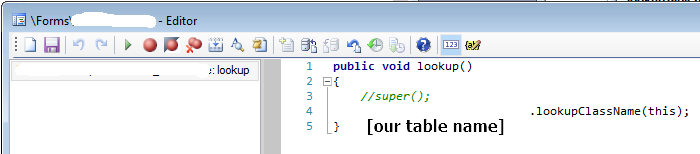
2. Add a lookup method to the form control


 public void lookup()  
 {  
   //super();  
   [OurTableName].lookupClassName(this);  
 }  


Thanks for reading and until the next post!

Sunday, December 26, 2021

X++ | Technique | Conditional select statement

This post is inspired (or in other word, re-written) from the nice post of Ramesh Singh https://stoneridgesoftware.com/conditional-where-clauses-in-select-statements-in-dynamics-ax.


Background

In many situations, we need a conditional select statement. To do so, the most practical way is to use the thing I called it the Query pattern (Query, QueryBuildDataSource, QueryRun, …).

The Query pattern absolultely works well, but there is an alternative technique.


Example

Let's check a standard method \Data Dictionary\Tables\CustTable\Methods\find.

 static CustTable find(CustAccount  _custAccount,  
                       boolean      _forUpdate = false)  
 {  
   CustTable custTable;  
   ;  
   if (_custAccount)  
   {  
     if (_forUpdate)  
           custTable.selectForUpdate(_forUpdate);  
     select firstonly custTable  
           index hint AccountIdx  
           where custTable.AccountNum == _custAccount;  
   }  
   return custTable;  
 }  

Let assume we add a new custom flag field IsActive, then we might need to extend the above implementation. There are several way to implement it. For example, adding a new method and name it like findActive or replacing the above statement with an if-else clause.


However, regarding Ramesh technique, we can make it a bit more simpler by the following code.

 static CustTable find(CustAccount  _custAccount,  
                       boolean      _isActiveCheck = false,)  
                       boolean      _forUpdate = false)  
 {  
   CustTable custTable;  
   ;  
   if (_custAccount)  
   {  
     if (_forUpdate)  
           custTable.selectForUpdate(_forUpdate);  
     select firstonly custTable  
           index hint AccountIdx  
           where custTable.AccountNum == _custAccount  
              && (!_isActiveCheck || custTable.isActive);  
   }  
   return custTable;  
 }  

The above technique is similar to the conventional QueryBuildDataSource.addRange we usually did. 


My opinion

In general, to build a dynamic and complex select statement (or query), the Query pattern is still my preferred choice.

But when adding a small customization as the above example, this technique is quite useful. It avoids the unnecessary redundant and safe a couple line of codes, even sacrifice a little bit self-described characteristic.


Thanks for reading. Until the next post!


Sunday, February 7, 2021

X++ | Reread, refresh, research, and executeQuery

This is my personal memo for these datasource methods which was described very well by this following url. https://community.dynamics.com/365/supply-chain-management/b/axvanyakashperuk/posts/tutorial-58-refresh-reread-research-executequery-which-one-to-use-63

I rewrite it here because I found it's quite difficult to memorize the above concept. The reason is probably these methods are sharing somethings in common, then difficult to distinguish. 


Getting a latest value


Reread     Get the current record value from database to form datasource cache.

Refresh    Get the current record value from form datasource cache to form control.

Commonly used: reread() and then refresh()


Rerunning a form datasource query

Research            Rerun the form datasource query against the database with base query + user interface filters.

ExecuteQuery    Rerun the form datasource query against the database with base query + dev code.

In other words (below are copied directly from above url):

    1) Research - when the research method is called, a new instance of the queryRun is created, using the formDataSource.queryRun().query() as the basis. Therefore, if the user has set up some filters on the displayed data, those will be preserved. 

    2) ExecuteQuery - on the other hand, will use the original query formDataSource.query() as the basis, therefore removing any user filters.

Friday, October 9, 2020

X++ | convert string (as Datetime) to UTCdatetime

 If we got a data from the external application like "2020-10-07T11:55:27". We can use the below code to convert it to UTCdatetime.

The above format is occurred when user send a datetime field from .NET through OData (Edm.Datetime).

 class ConvertStr2UTCdatetime_Job_Test  
 {  
   public static void main(Args _args)  
   {  
     str     	 testStr = "2020-10-07T11:55:27";
     utcdatetime testUTCdateTime;  
     ;  
 
     testStr = strReplace(testStr, "T", " ");  
     testUTCdateTime = str2datetime(testStr, 321);  
     info(strFmt("testUTCdateTime %1", testUTCdateTime));  
     info('done');  
   }  
 }  


Until the next post!


Thursday, November 21, 2019

X++ | Image resource location

I rewrite this article from this link https://community.dynamics.com/ax/b/klaasdeforche/posts/forms-tutorial-resources-and-sysimageresources as it might be useful for some devs still work on legacy AX.

You can access these below resource from the forms at the bottom.


AX 4.0     forms\Tutorial_Resources
AX 2009  forms\SysImageResources
AX 2012  forms\SysImageResources

Thanks for reading!

Sunday, November 10, 2019

AX 2012 | get CompanyInfo and Vendor data through T-SQL

This post describes the table relation of Company and Vendor data written in T-SQL. In AX 2012, the information of Company and Vendor do not kept only in a single table, so this might be useful to understand their data model and relation.

Company Info
 select  
    -- DPT.RecId as DPT_RecId  
       --,DPL.RECID as DPL_RecId  
       --,LPA.RecId as LPA_RecId  
     DPT.DATAAREA  
    ,DPT.NAME  
    ,DPT.NAMEALIAS  
    ,DPT.LANGUAGEID  
       ,LPA.Street  
       ,LPA.City  
       ,LPA.ZipCode  
       ,LPA.CountryRegionId  
    --,DPT.PARTYNUMBER  
    --,DPT.INSTANCERELATIONTYPE  
    --,DPT.KNOWNAS  
    --,DPT.PRIMARYADDRESSLOCATION  
    --,DPT.PRIMARYCONTACTEMAIL  
    --,DPT.PRIMARYCONTACTFAX  
    --,DPT.PRIMARYCONTACTPHONE  
    --,DPT.PRIMARYCONTACTTELEX  
    --,DPT.PRIMARYCONTACTURL  
    ,DPT.MODIFIEDDATETIME  
    ,DPT.MODIFIEDBY  
    ,DPT.CREATEDDATETIME  
    ,DPT.CREATEDBY  
    --,DPT.RECVERSION  
    --,DPT.RELATIONTYPE  
    --,DPT.PARTITION  
    --,DPT.EDI_GLN  
 from [dbo].[DIRPARTYTABLE] as DPT  
 left outer join [dbo].[DIRPARTYLOCATION] as DPL   
      on     DPT.RecId = DPL.Party  
      and DPT.PRIMARYADDRESSLOCATION = DPL.Location  
      and DPL.IsPrimary = 1  
 left outer join [dbo].[LOGISTICSPOSTALADDRESS] as LPA   
      on     DPL.Location = LPA.Location  
      and LPA.ValidFrom <= SYSDATETIME()  
      and LPA.ValidTo >= SYSDATETIME()  
 where DPT.INSTANCERELATIONTYPE = 41  


Vendors
 select  
    -- VNT.RecId as VNT_RecId  
       --,DPT.RECID as DPT_RecId  
       --,DPL.RECID as DPL_RecId  
       --,LPA.RecId as LPA_RecId  
       --,TRE.RecId as TRE_RecId  
       --,VBA.RecId as VBA_RecId  
        VNT.DATAAREAID  
    ,VNT.ACCOUNTNUM  
       ,DPT.Name  
       ,LPA.Street  
       ,LPA.City  
       ,LPA.ZipCode  
       ,LPA.CountryRegionId  
       ,TRE.RegistrationNumber          as Tax_regist_num  
       ,VBA.AccountId                    as Bank_ID  
       ,VBA.Name                              as Bank_Name  
       ,VBA.AccountNum                    as Bank_account_num  
       ,VBA.SwiftNo                         as Bank_Swift_code  
       ,VBA.BankIBAN                         as Bank_IBAN  
 from [dbo].[VENDTABLE] as VNT  
 left outer join [dbo].[DIRPARTYTABLE] as DPT   
      on     VNT.Party = DPT.RecId  
 left outer join [dbo].[DIRPARTYLOCATION] as DPL   
      on     DPT.RecId = DPL.Party  
      and DPT.PRIMARYADDRESSLOCATION = DPL.Location  
      and DPL.IsPrimary = 1  
 left outer join [dbo].[LOGISTICSPOSTALADDRESS] as LPA   
      on     DPL.Location = LPA.Location  
      and LPA.ValidFrom <= SYSDATETIME()  
      and LPA.ValidTo >= SYSDATETIME()  
 left outer join [dbo].[TAXREGISTRATION] as TRE   
      on     DPL.RecId = TRE.DirPartyLocation  
      and TRE.ValidFrom <= SYSDATETIME()  
      and TRE.ValidTo >= SYSDATETIME()  
 left outer join [dbo].[VENDBANKACCOUNT] as VBA   
      on     VNT.AccountNum = VBA.VendAccount  


Thanks for reading! Until the next post!


References
https://community.dynamics.com/ax/f/microsoft-dynamics-ax-forum/296010/companyinfo-table-in-ax-2012
https://community.dynamics.com/365/financeandoperations/b/goshoom/posts/queries-to-tables-with-inheritance


Saturday, July 27, 2019

X++ | convert string to UTC date time

Let say we had an UTC date time which was kept in 'String'. And now we'd like to display it with the client setting time zone. We can do it as below.


 static void Job10(Args _args)  
 {  
   // 1) Save UTC date time to string  
   str          strValue = DateTimeUtil::toStr(DateTimeUtil::utcNow());  
   utcdatetime  utcValue;  
   boolean      isUTCDateTime = false;  
   ;  
   info(strFmt('Value (as saved string) = %1', strValue));  
   // 2) convert 'Saved' String to UTC date time  
   utcValue = DateTimeUtil::parse(strValue);         
   if (utcValue != utcDateTimeNull())  
     isUTCDateTime = true;  
   // 3) convert UTC date time to string with apply time zone offset  
   if (isUTCDateTime)  
   {  
     strValue = DateTimeUtil::toStr(DateTimeUtil::applyTimeZoneOffset(utcValue,  
                                                                      DateTimeUtil::getUserPreferredTimeZone()));  
   }  
   info(strFmt('Value (after convert) = %1', strValue));  
   info('done');  
 }  


The result is here.


Until the next post!

Wednesday, May 15, 2019

AX 2012 | compilation warning | SysDictClass::is method is obsolete

I got this warning from AX 2012 R3 CU13.


The SysDictClass::is method is obsolete. Use the IS operator instead.


Solution
I found a helpful tip from http://dynamics-ax-chronicles.blogspot.com/2011/07/form-control-type-at-run-time.html .

So after I change the code manually as follows, the warning is resolved.

     //if (SysDictClass::is(element.args().caller(), classnum(FormRun)))  
     if (element.args().caller() is FormRun)  

Until the next post!


Tuesday, May 14, 2019

AX2012 R3 | Issue while upgrade code | axmodel is from a newer version and cannot be installed

I found an issue while upgrade AX 2012 R3 code to the latest CU (6.3.6000.8.144).


https://cloudblogs.microsoft.com/dynamics365/no-audience/2012/03/29/overview-of-microsoft-dynamics-ax-build-numbers/?source=axsupport


However while I upgrading the binary(kernel) and application, I got the error.

The model file C:\ProgramData\Microsoft\Dynamics AX\Package\2019-05-14 13-57-20\GranularModels\DynamicsAX2012R3_CL4581239.axmodel is from a newer version of Microsoft Dynamics AX (version 6.3.6000.6863) and cannot be installed.


Found update model(File: C:\ProgramData\Microsoft\Dynamics AX\Package\2019-05-14 13-57-20\GranularModels\DynamicsAX2012R3_CL4581665.axmodel, Layer: Syp, Name: Hotfix-KB4492605-4581665-Foundation, Version: 6.3.6000.8136, Partition: Foundation)
Found update model(File: C:\ProgramData\Microsoft\Dynamics AX\Package\2019-05-14 13-57-20\GranularModels\DynamicsAX2012R3_CL4581666.axmodel, Layer: Syp, Name: Hotfix-KB4492767-4581666-Foundation, Version: 6.3.6000.8141, Partition: Foundation)
Found update model(File: C:\ProgramData\Microsoft\Dynamics AX\Package\2019-05-14 13-57-20\GranularModels\DynamicsAX2012R3_CL4581667.axmodel, Layer: Syp, Name: Hotfix-KB4492770-4581667-Foundation, Version: 6.3.6000.8145, Partition: Foundation)
Evaluating applicability requirements for model file: C:\ProgramData\Microsoft\Dynamics AX\Package\2019-05-14 13-57-20\GranularModels\DynamicsAX2012R3-KB4103631-FoundationUpgrade.axmodel
Required model (Layer: SYS, Name: Foundation Upgrade, Version: 6.3.164.0) is installed: False
Evaluating applicability requirements for model file: C:\ProgramData\Microsoft\Dynamics AX\Package\2019-05-14 13-57-20\GranularModels\DynamicsAX2012R3-KB4103631-SYPLabels.axmodel
Required model (Layer: SYS, Name: Foundation, Version: 6.3.164.0) is installed: True
Update model file is installed: False
Getting contents of model file C:\ProgramData\Microsoft\Dynamics AX\Package\2019-05-14 13-57-20\GranularModels\DynamicsAX2012R3_CL4581239.axmodel
Exception: Microsoft.Dynamics.AX.Framework.Tools.ModelManagement.ModelBuildVersionException

 Message: The model file C:\ProgramData\Microsoft\Dynamics AX\Package\2019-05-14 13-57-20\GranularModels\DynamicsAX2012R3_CL4581239.axmodel is from a newer version of Microsoft Dynamics AX (version 6.3.6000.6863) and cannot be installed.


 FullText: Microsoft.Dynamics.AX.Framework.Tools.ModelManagement.ModelBuildVersionException: The model file C:\ProgramData\Microsoft\Dynamics AX\Package\2019-05-14 13-57-20\GranularModels\DynamicsAX2012R3_CL4581239.axmodel is from a newer version of Microsoft Dynamics AX (version 6.3.6000.6863) and cannot be installed.
   at Microsoft.Dynamics.AX.Framework.Tools.ModelManagement.ModelAssemblyReader..ctor(String modelAssemblyFileName, AxUtilContext context, AxUtilConfiguration config, SqlResources sqlResources)
   at Microsoft.Dynamics.AX.Framework.Tools.ModelManagement.AxUtil.View(String modelFileName, Boolean verbose)
   at Microsoft.Dynamics.Setup.ApplicationModelFile.GetModelElements()


Reason
The reason is I originally launched the axupdate.exe from the older KB. In this case, It is KB4032175 (or CU13).
**I launch from KB4032175 instead, because KB4492767 file consists only binary(Kernel) update.


However, in the updating processes, I found the newer update, so I chose the newer one. That caused the above trouble.


Solution
So choose only the CU version that matches to the axupdate version, then the issue is resolved.


Until the next post!

Monday, May 13, 2019

AX2012 | CIL generation warning | sysEPWebPageDefinition

During my AX 2012 R3 RTM installation, I found some warnings left after do 'Generate full CIL'.


Path
\Classes\sysEPWebPageDefinition\deployModuleOnServer (1st line)
\Classes\sysEPWebPageDefinition\deployPageOnServer (2nd line)

Error message
CIL generation: Exception was thrown because the .NET instance method Microsoft.Dynamics.Framework.Portal.Deployment.EPWebModule.DeployWebModuleFromAOT was not found during CIL generation in class sysEPWebPageDefinition.deployModuleOnServer. (1st line)

CIL generation: Exception was thrown because the .NET instance method Microsoft.Dynamics.Framework.Portal.Deployment.EPWebPartPage.ImportWebPartPageFromAOT was not found during CIL generation in class sysEPWebPageDefinition.deployPageOnServer. (2nd line)

Analysis
First of all, it seems to be that you can ignore this kind of warning if you're not interested to use Enterprise portal or SharePoint function.

However if you would like to clean up all of above warning. You need to install SharePoint Foundation 2010 (even you don't use it further).

Solution
1) Install MS SharePoint foundation 2010, and configure a SharePoint site.

2) Do 'Compile forward' the classes.

3) Do 'Generate full CIL' again, the warning should be disappeared.


Thanks for reading!


Ref:
https://community.dynamics.com/ax/f/33/t/227923
https://community.dynamics.com/ax/f/33/t/134993
https://cloudblogs.microsoft.com/dynamics365/no-audience/2011/02/14/sample-steps-on-installing-and-configuring-sharepoint-2010-and-deploying-ax-2009-role-centers-and-enterprise-portal/ (SharePoint install and configure guideline)


AX2012 | CIL generation warning | .NET type Symmetry.TaxEngine.BenefitType is not found during IL generation

During my AX 2012 R3 RTM installation, I found some warnings left after do 'Generate full CIL'.


Path
\Classes\PayrollCalculatePayStatementBenefits\retrieveSymmetryBenefitLimits

Error message
CIL generation: Severe Warning: .NET type Symmetry.TaxEngine.BenefitType is not found during IL generation. 'PayrollCalculatePayStatementBenefits.retrieveSymmetryBenefitLimits' will throw an exception at run time.


Analysis
First of all, it seems to be that you can ignore this kind of warning if you're not interested to use US Tax payroll function.

However if you would like to clean up all of above warning. The possible ways are:

Option A -  Install related components or libraries US Tax payroll functions needed. However at the moment I don't have details about this. ; )  (Would be good if someone can help to clarify as well)

Option B -  And this is my choice. Just omit it! Because of my current tasks not related to that tax feature, so disabling the function is fit to me.

Solution (as skip)
1) Deselect the US payroll function


2) After that, do generate full CIL again. The warnings would be disappeared.


Until the next post!


Thursday, April 25, 2019

X++ | Change EDT of a table field

Sometimes we probably need to change EDT of a table field because lack of well designed or best practice. However after stored some data in a table, then it cannot be done only by renaming the EDT like we usually do when creating a new table.

The following instruction are one of possible practice I tried. I got the idea from Martin DrĂ¡b in this link https://dynamicsuser.net/ax/f/developers/48678/table-field-change.

    - list all field will be changed             
    - create all new EDT                           
    - backup table data (just in case)
    
    **Note: the following 4 steps need to done respectively shortly in IDE.
    - rename field name to something like OLD_xxx
    - add new field (with old name xxx)
    - build (for d365FO or compile in other previous versions)
    - synchronize with database

    - copy value from old to new field (this is my first thought, however no need as the new created field already stored the old data)
    - delete old field (OLD_xxx)
    - delete old EDT

**Note1: This is case of String EDT, in other cases (i.e. Integer -> Real) you might do some further test.
**Note2: Before deleting old field. If the field you are changing is being used as one of table index. You need to check that index also, because that index field also is changed to OLD_xxx. That you need to correct as well.
**Note3: Before deleting old field. Check table property like titlefield also, it also can still keep OLD_xxx.

Until the next post!

Monday, November 19, 2018

X++ | ax 2012 - Create a lookup with a table fields list

Scenario
Let's say we have a table, for example SalesTable. Then we would like to create a lookup with all fields from that table. This below is a simple way we can do in ax 2012.

Solution
So you have a field with lookup (override) method as follows.


In the lookup method, put this below code.

 public void lookup()  
 {  
 ;  
   YourExampleTable.lookupTableField(this);  
 }  

At YourExampleTable table, insert this below method. You will note that the name of table we'd like to get all lists is from ..tableName2id(this.refTableName).  You can change it to fit your need.

 public void lookupTableField(FormControl _formControl)  
 {  
   SysTableLookup sysTableLookup = SysTableLookup::newParameters(Tablenum(Utilelements),_formControl);  
   Query query = new Query();  
   QueryBuildDataSource qbd;  
 ;  
   SysTableLookup.addLookupfield(fieldnum(Utilelements,name));  
   qbd = query.addDataSource(Tablenum(Utilelements));  
   qbd.addRange(fieldnum(Utilelements,RecordType)).value(queryvalue(UtilelementType::TableField));  
   qbd.addRange(fieldnum(Utilelements,ParentId)).value(queryvalue(tableName2id(this.refTableName)));  
   sysTableLookup.parmQuery(query);  
   systableLookup.performFormLookup();  
 }  


That's all!

Thursday, October 18, 2018

d365FO - copy data from a table to another table

Hi, I found this post Rahul's AX Blog copy-data-from-one-table-to-another is very useful, so I just keep it here.

The scenario is you have table AAA, and then duplicate a new table CopyAAA. Then you would like to copy the data records across them.

The code is written as d365FO job. However it works on ax 2012, 2009 and 4.0 as well.

class CopyAcrossTable
{        

    public static void main(Args _args)
    {   
        void buf2buf(Common  _from, Common  _to)
        {
            DictTable   dictTableFrom   = new DictTable(_from.TableId);
            DictTable   dictTableTo     = new DictTable(_to.TableId);
            DictField   dictFieldFrom;
            FieldId     fieldIdFrom     = dictTableFrom.fieldNext(0);
            FieldId     fieldIdTo
;


            while (fieldIdFrom && ! isSysId(fieldIdFrom))
            {
                dictFieldFrom   = new DictField(_from.TableId, fieldIdFrom);


                if(dictFieldFrom)
                {
                    fieldIdTo = dictTableTo.fieldName2Id(dictFieldFrom.name());


                    if(fieldIdTo)
_to.(fieldIdTo) = _from.(fieldIdFrom);
                }


                fieldIdFrom = dictTableFrom.fieldNext(fieldIdFrom);
            }
        }

        AAA aaa;
        CopyAAA copyAAA;
        ;
  
        while select aaa
        {
            buf2Buf(aaa, copyAAA);
            copyAAA.insert();
        }

        info("Copy done!");

    }

}


Until the next post!